
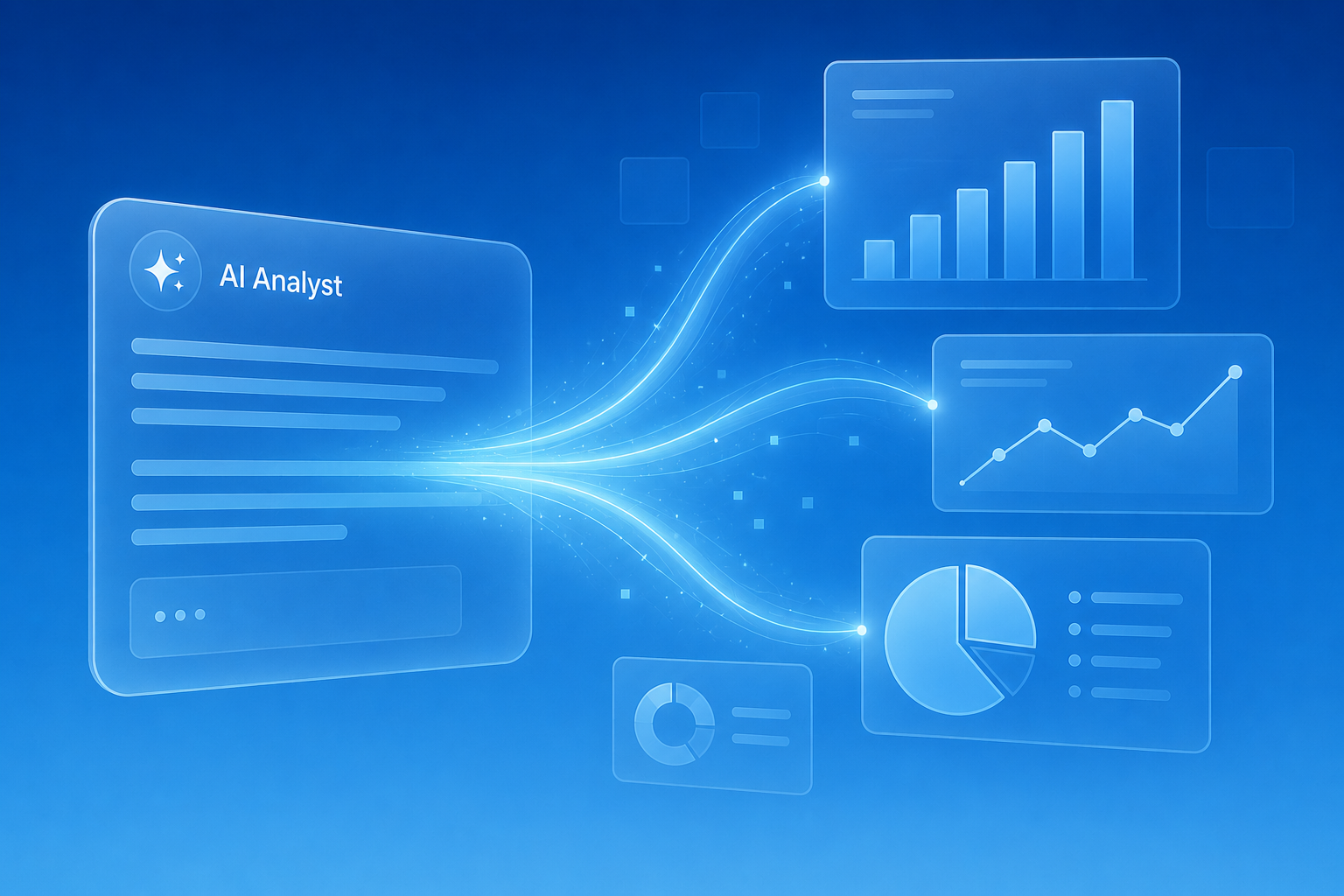
Standard Metrics’ Software Engineer Elias Tounzal dives into the launch of charts in our AI Analyst and how we’re used OpenUI to make our Analyst’s responses more visual, interactive, and useful.
Large language models have become remarkably good at answering questions. But in many cases the best answer isn’t a paragraph of text; it’s a visual.
At Standard Metrics, our PE/VC customer regularly use our AI Analyst to query the quantitative and qualitative data they already have stored on Standard Metrics to answer questions about their portfolio. But if an investor asks a question like “Show me the companies with the highest revenue growth in my portfolio,” a chart is often more useful than a written explanation. A chart can provide more impact across subsequent investor workflows as it can be incorporated in an LP presentation or used as ammo for an investment memo.
This is the core idea behind Generative UI: instead of generating only text, an AI system generates interfaces that help users explore and understand information.
At Standard Metrics, we’ve been building a generative UI architecture that allows our AI Analyst to render structured visual components like charts alongside traditional text responses, and launched this month alongside web search.
Rather than treating the interface as something predefined by engineers, the system can decide how information should be presented based on the user’s request. The result is a more adaptable experience that preserves the reliability and predictability that our customers depend on in the AI Analyst.
We dive into how we built it below.
Why We Chose Thesys’ OpenUI
Our implementation is built around OpenUI, an open standard created by Thesys (GitHub Repository).
OpenUI provides a structured language for describing interfaces rather than generating framework-specific code. This distinction is important.
Many generative UI systems rely on approaches similar to JSON-based renderers or direct React code generation. While these approaches can be flexible, they often require custom schemas, custom rendering logic, or introduce challenges around validation and maintainability.
OpenUI, instead, offers several advantages:
- A standardized representation for UI generation
- Clear separation between generation and rendering
- Easier validation of generated output
- Framework-agnostic interface descriptions
- Improved interoperability between AI systems and frontend applications
- A highly compact representation compared to large JSON-based UI specifications
The last point became particularly important for us. OpenUI Lang is designed as a lightweight textual representation of an interface rather than a deeply nested JSON structure. Because the generated output is significantly smaller, it reduces token usage, lowers inference costs, and improves streaming performance.
This makes OpenUI especially well suited for real-time AI applications — like our AI Analyst — where interface specifications are generated and streamed to users as part of the response. Because the language describes what should be rendered rather than how the implementation should be written, it fits naturally into production AI workflows.
Our First Generative Components: Charts in AI Analyst
Before introducing generative UI, AI Analyst responses at Standard Metrics consisted entirely of Markdown, with paragraphs versus visuals answering investors’ portfolio questions.
Generative UI gave us a structured way to move beyond text and introduce visualizations directly into AI responses. Today, at Standard Metrics that now primarily means aggregating portfolio company data into eight different types of charts: horizontal bar, vertical bar, grouped bar, stacked, line, area, pie, and scatter. Now the AI Analyst can present information visually when a graph communicates the answer more effectively than a paragraph.
Starting with a focused set of components allows us to maintain a predictable and reliable experience while validating the architecture in production. And, more importantly, it establishes a foundation for future expansion. The generation, streaming, and rendering pipeline are in place, additional components can be introduced without changing the system.
Integrating Generative UI into an Existing Architecture
One advantage of our approach of using OpenUI was that the build did not require a complete redesign of the assistant stack.
The mechanisms responsible for tool calling, response synthesis, and streaming already existed as part of our AI platform. Introducing OpenUI primarily changed how responses are represented and rendered.
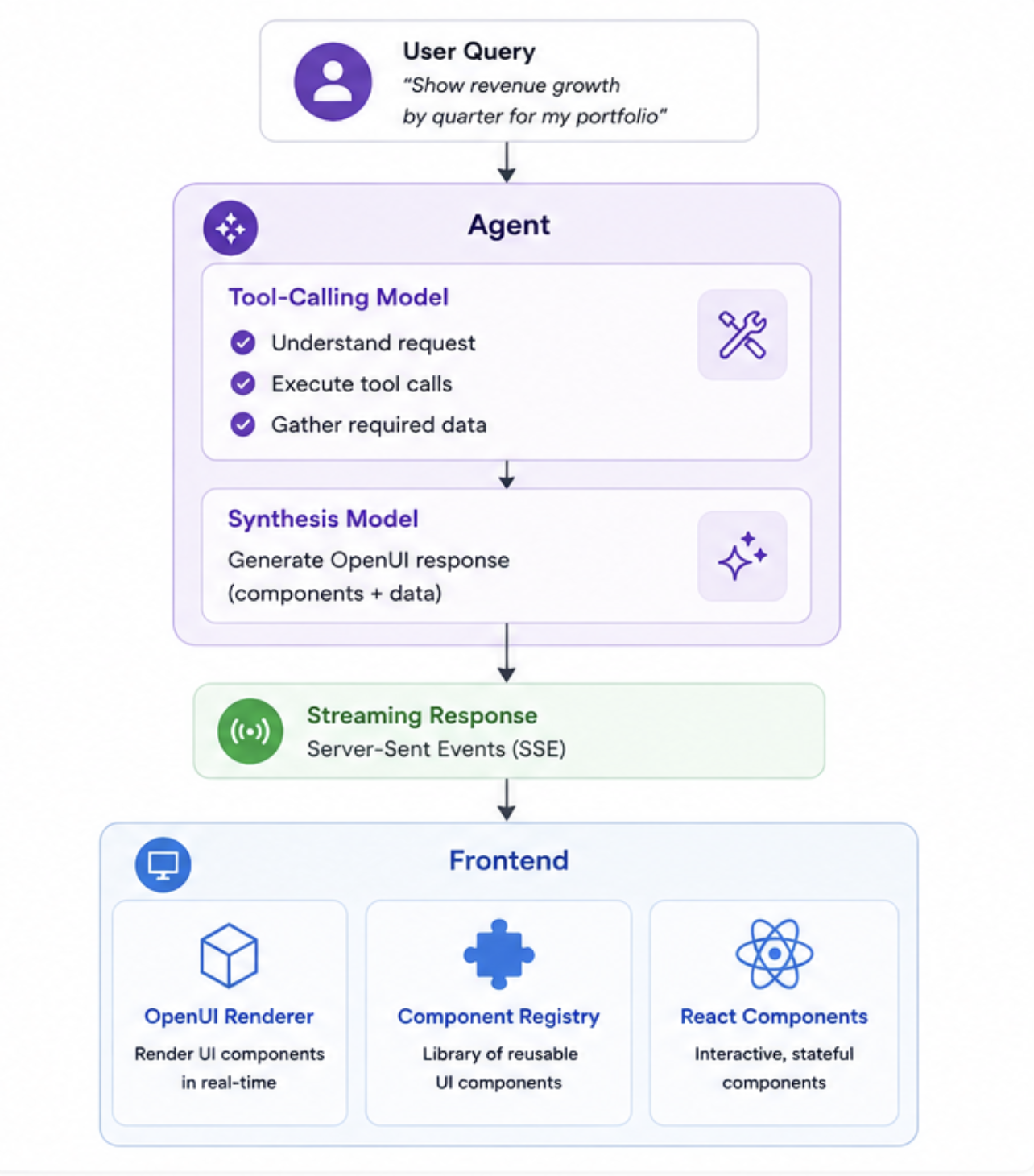
Rather than generating React components directly, the synthesis model produces an OpenUI specification describing the response. That specification is streamed to the frontend and rendered using a predefined component library.
Because OpenUI became the common output format, both traditional text responses and richer visual responses in our AI Analyst both follow the same rendering pipeline.
Separating Tool Calls from Presentation
To make responses more consistent and accurate, we structured the agent behind the AI Analyst into two language models with distinct responsibilities.
The first model focuses on understanding the request, executing tool calls, and gathering the information required to answer the user’s question. Once all necessary information has been collected, a second model receives that context and generates the final OpenUI response.
Separating information gathering from presentation improves consistency of generated responses and allows the response format to evolve independently from the data-gathering process. This helps the engineering team with long-term maintainability of the AI Analyst. We can keep improving the quality and diversity of the response we provide to our customers, without having to change the underlying agent structure that takes care of fetching the data.
Streaming the Interface
Generative UI responses to customer queries on the AI Analyst are delivered through Server-Sent Events (SSE), allowing content to be streamed to the frontend as it is generated.
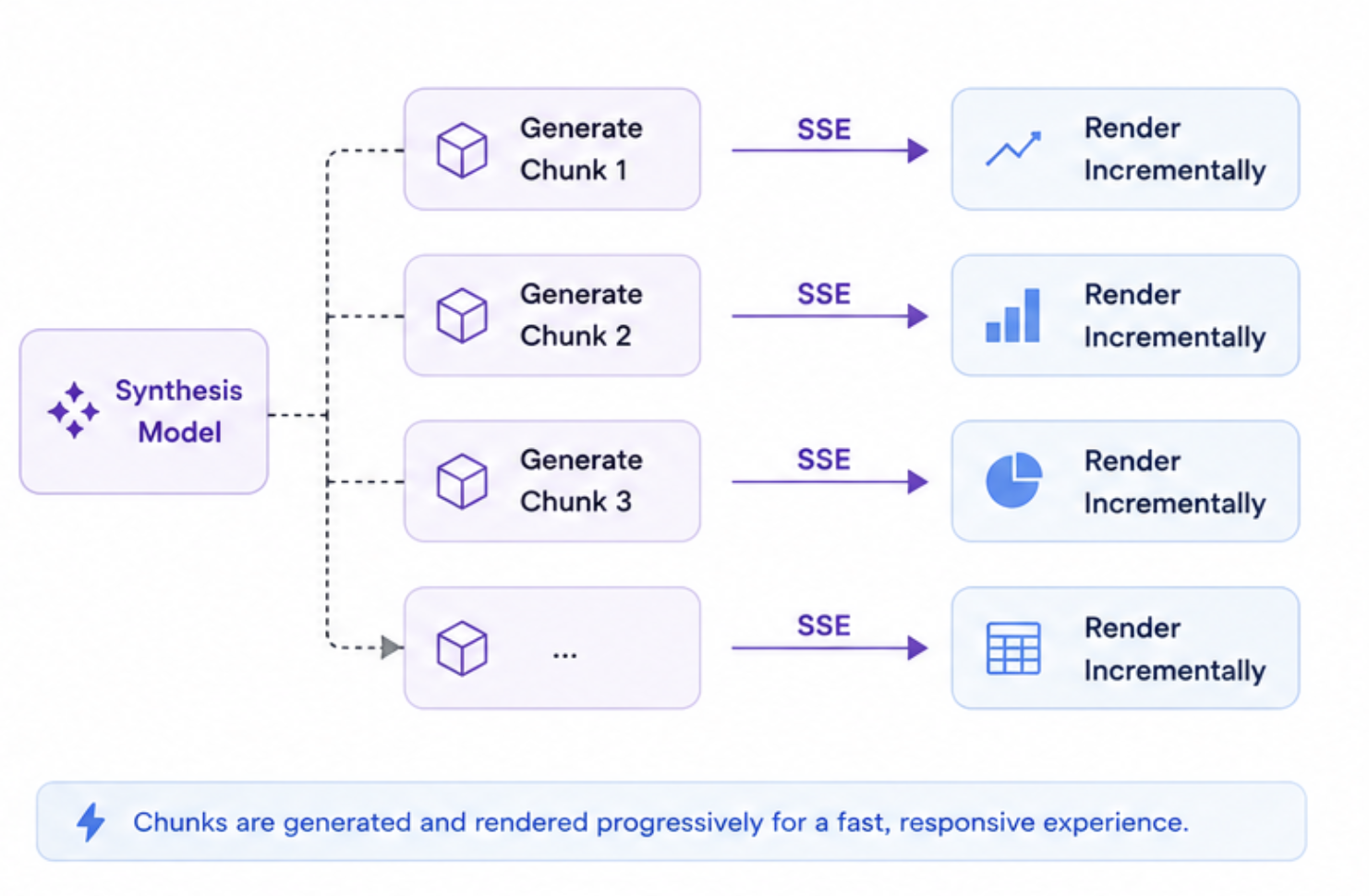
This streaming architecture existed before Generative UI was introduced, and now naturally extends to OpenUI responses. As the synthesis model generates the interface specification, it is progressively transmitted and rendered, creating a faster and more responsive user experience.
Rendering on the Frontend
On the frontend, Generative UI in the AI Analyst is powered by two complementary pieces: a component registry and an OpenUI renderer.
The component registry defines which components the assistant is allowed to render. Today, that primarily means Markdown and chart components, with room for additional components as the system evolves.
The OpenUI renderer translates generated OpenUI specifications into React components by mapping them to the registered component library.
This approach keeps generation separate from execution, allowing the interface to evolve while maintaining a predictable rendering environment.
Backward Compatibility
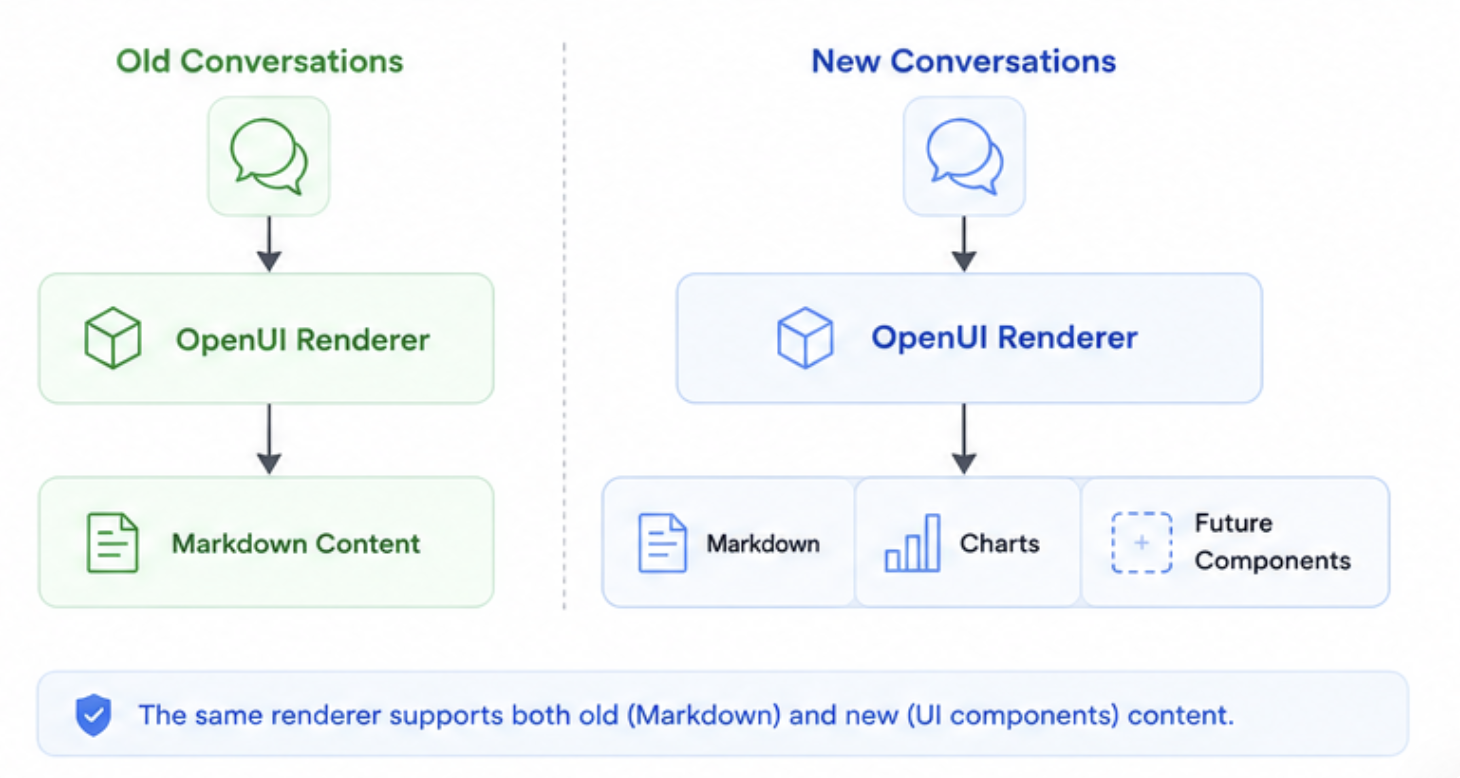
Introducing generative UI shouldn’t break existing experiences. For that reason, the system remains fully compatible with older conversations that contain only Markdown responses.
When an older conversation is opened, the renderer simply displays the original Markdown content.
This allows us to evolve the platform without requiring migrations or creating separate viewing experiences. Users can seamlessly move between historical conversations and newer generative UI experiences.
Looking Ahead
Generative UI is still early, but we believe it represents an important evolution in how users interact with AI systems.
The future of AI applications is unlikely to be purely conversational. Instead, responses will increasingly combine language, visualizations, and interactive interfaces tailored to the task at hand.
By building on open standards such as OpenUI and maintaining a controlled rendering architecture, we’re able to explore that future while preserving the reliability our customers depend on.
We’re excited to continue expanding the component library and discovering new ways AI can help our customers understand and interact with their data.
Automate your portfolio reporting
Find out how you can:
- Collect a higher volume of accurate data
- Analyze a robust, auditable data set
- Deliver insights that drive fund performance